Tattoo AR Drawing & Find Idea
- 3.9
- Rating
- 10.00K
- Installs
- Free
- Price
 Analysis by App-foxy
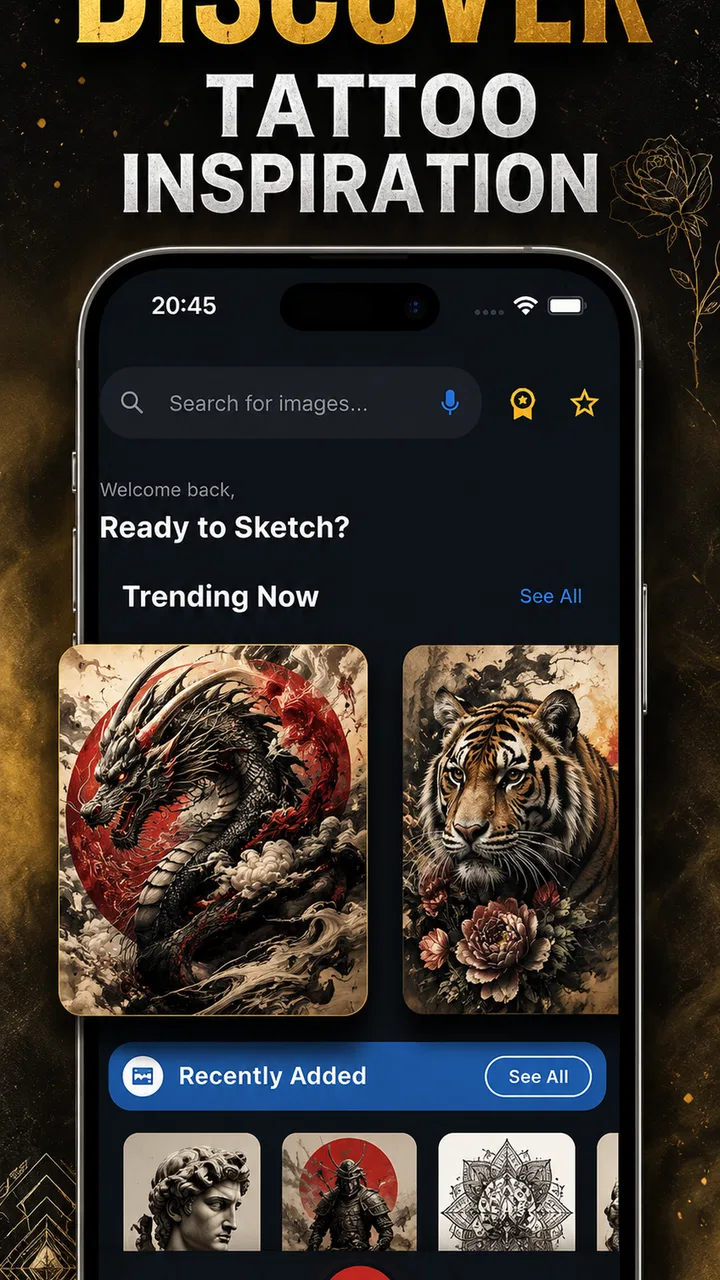
When I try a tattoo idea app, I am not only looking for attractive pictures. I want to know whether I can browse without getting lost, understand what I am seeing, and turn a vague idea into something useful for a tattoo conversation. Tattoo AR Drawing & Find Idea, made by bizo games, takes a beauty-focused approach to tattoo inspiration, combining artwork, image browsing, ink ideas, and an augmented-reality drawing concept. My overall impression is that it is most useful as a visual starting point rather than as a complete tattoo design studio.
The app is free to install and is rated for Everyone, which makes it approachable for casual browsing. It has passed the early discovery stage with over ten thousand installs and an average rating of 3.9 from around seventy ratings. That is a modest sample, so I would treat the score as a general signal rather than a final verdict. I found the app easier to appreciate when I used it for one focused task at a time: collecting references, comparing placement ideas, or sketching a rough direction before speaking with a professional artist.
How Tattoo AR Drawing & Find Idea works for different people and situations
I find this app most useful when I treat its visual and AR drawing concept as a way to explore an idea, not as a shortcut to a finished tattoo. In the sections that follow, I look at how that approach can help different people narrow their choices, and why the most useful result is often a clearer conversation with an artist.
You May Also Like

 AccuWeather: Weather Radar
AccuWeather Review: A Quick, Clear Forecast for Everyday Decisions
For everyday plans, the best forecast is the one you can understand quickly. AccuWeather makes rain timing, radar, and local conditions easy to act on, with a few trade-offs.

 Hill Climb Racing
Why Hill Climb Racing Still Turns Crashes Into One More Run
A tiny car, a bumpy hill and one more upgrade: Hill Climb Racing keeps resurfacing because its simple chaos makes every near-miss feel personal.

 AliExpress - Shopping App
AliExpress Makes Global Shopping Feel Personal, but Shoppers Bear the Risk
AliExpress turns a global marketplace into a pocket-sized discovery engine. Its reach is useful, its shopping loop compelling, and its trade-offs easy to miss.

 Lords Mobile: Kingdom Wars
Lords Mobile Is a Kingdom-Building Routine, Not a Quick Match
A case-by-case verdict on the building, battles, device demands, and social commitments that make Lords Mobile rewarding for some players and exhausting for others.

 PDF Scanner app - TapScanner
TapScanner Makes Paperwork Easier to Capture, Check, and Share
TapScanner makes scanning with a phone feel less like a rescue operation and more like a dependable step in getting work done. Its capture tools are useful, though not flawless.

 Block Blast!
 Shows How Much a Puzzle Game Can Leave Out
A quiet grid game shows why puzzle players increasingly value instant clarity, repeatable skill and low-pressure play—and where the genre still needs to catch up.
More From Our News Desk
View All News


Readability and navigation during ordinary browsing
The first thing I look for in a visual app is whether the screen helps me decide what to do next. Tattoo AR Drawing & Find Idea is built around images and inspiration, so its value depends heavily on quick visual scanning. That suits users who already know they want to explore tattoo artwork. Instead of beginning with a complicated design brief, I can approach it with a simple question such as “What kind of line style do I like?” or “Would a small symbol look better on my wrist or shoulder?”
That image-first approach is helpful for people who find it easier to recognize a style than to describe one. Someone may not know the difference between several tattoo traditions by name, but they can still notice whether an example feels too heavy, too delicate, too busy, or close to what they imagined. I consider that one of the app’s strongest inclusive qualities: it gives visual thinkers a way into the planning process without requiring specialist vocabulary.
At the same time, image-heavy browsing can create its own difficulty. A page full of artwork may be attractive but not always easy to interpret quickly. If a user needs strong structure, clear labels, or a very direct route from inspiration to saved plan, the experience may feel less comfortable than a dedicated design editor. I would use it in short sessions and keep a simple purpose in mind rather than scrolling indefinitely.
For a first-time tattoo customer, I recommend making a small mental checklist while browsing. Look at the shape of the design, the amount of open space, the apparent line weight, and how the artwork sits on the body. This prevents the common mistake of choosing an image only because it looks impressive in isolation. An idea that works as a flat picture may need substantial changes before it becomes suitable for real skin.
The app’s current version is 31.0.7, and it requires Android 6.0 or later. That broad operating-system requirement makes it relevant to people using older Android phones, although the actual comfort of browsing will still depend on the device’s display, speed, and touch response. I would not judge the experience only from the software requirement. A larger, brighter screen can make visual comparison much easier than a small phone, especially for users who need to enlarge details or reduce eye strain.
Motor control, visual comfort, and sensory load
The drawing side of the app deserves a different kind of attention from the browsing side. Drawing on a phone is not the same as drawing on paper. It can be convenient for a quick outline, but it also demands controlled finger movement, repeated taps, and enough screen space to make corrections comfortably. For me, this makes the drawing function better for rough exploration than for precise artwork.
Users with limited fine-motor control may find a small touchscreen demanding, particularly when a design needs smooth curves or careful symmetry. A practical workaround is to simplify the first pass. Instead of trying to reproduce every detail, I would mark the main silhouette, identify the central motif, and leave fine linework to a tattoo artist or a more suitable drawing tool. This workflow reduces pressure and produces a clearer reference.
People who experience visual fatigue should also be selective about how long they browse. Tattoo images often contain dense black areas, thin lines, and high-contrast details that can become tiring when viewed continuously. Increasing the phone’s text size may not change the artwork itself, so users who need larger visual elements should consider using a bigger screen when possible. I found that taking a reference away from the app and viewing it at a comfortable size is more useful than forcing every decision on the phone.
For users who are sensitive to visual clutter, the best approach is to narrow the search early. Choose one subject, one mood, or one body area, then stop when a few promising references emerge. The app is more manageable as a tool for collecting direction than as an endless feed. That distinction matters because accessibility is not only about whether a feature exists; it is also about whether the user can control the amount of information being presented.
Augmented-reality drawing can be appealing for people who want to think about scale and placement in a more physical way. However, I would treat any on-screen preview as a planning aid, not a measurement or a promise of how a finished tattoo will look. Body contours, movement, skin tone, lighting, and the artist’s technique all affect the result. Someone who needs a highly predictable outcome should take the concept to a professional and ask for a custom stencil or placement consultation.
Using it at home, with friends, or before an appointment
A realistic everyday use case is planning a first tattoo with a friend. I might browse in the evening, collect a few images that share a mood, and compare them with a friend before contacting an artist. The app is useful here because a visual reference can communicate more quickly than a long description. Rather than saying “I want something simple but not plain,” I can show the kinds of shapes and line treatments that feel right to me.
It can also help someone prepare for a consultation after a design idea has changed several times. I would not present one image as a finished instruction. I would show two or three references and explain what I like in each: perhaps the composition from one, the spacing from another, and the subject from a third. This gives the artist room to create an original design instead of tracing a picture that was never made for my body.
For group use, the app is easy to imagine as a conversation starter. A person who is nervous about describing a tattoo can let a friend browse alongside them and point to examples. That can be especially helpful for users who communicate more comfortably through images than through detailed spoken explanations. The limitation is that the app does not replace the need to discuss size, placement, healing, longevity, and adaptation with the tattoo professional.
Situational access matters as well. A phone is convenient while traveling, waiting for an appointment, or sitting with someone who wants to compare ideas. But a small screen, glare outdoors, weak battery, or a noisy environment can make detailed review uncomfortable. If I were planning a serious piece, I would use the app for discovery and then move the shortlist to a calmer setting where I could inspect it properly.
Where the experience still creates barriers
The biggest barrier is the gap between inspiration and finished design. The app can help me find a direction, but a collection of images is not automatically a coherent tattoo. Beginners may need guidance on how to turn references into a brief: subject, approximate size, placement, preferred level of detail, and what should be avoided. Without that step, browsing can become attractive procrastination rather than useful preparation.
Another limitation is precision. A phone-based drawing process is not ideal for complex geometry, lettering, or designs that depend on exact proportions. If I wanted a carefully balanced mandala, detailed portrait, or refined typographic piece, I would choose a dedicated drawing application or work directly with an artist. Tattoo AR Drawing & Find Idea is better suited to rough visual thinking than to professional production.
There is also a personal-interpretation barrier. Tattoo artwork can look different across skin tones, body shapes, and lighting conditions, while a reference image may not show those differences clearly. I would avoid assuming that an example will transfer unchanged to my own body. A good artist can adjust contrast, spacing, and line weight, but that conversation needs to happen outside the inspiration stage.
The free model makes the app easy to try, but in-app purchases cost $3.49 per item. That does not automatically make the app poor value, yet it does mean I would pay attention before selecting anything that triggers a purchase. For casual users, the free experience may be enough to decide whether the concept is useful. For anyone on a tight budget, it is sensible to establish a clear purpose before buying an optional item rather than treating every extra as necessary.
Users who want a polished, layer-based editor, professional export controls, or a complete tattoo booking journey should probably look elsewhere. The same is true for someone who already has a precise design and only needs technical preparation. In those situations, a specialist art tool or direct artist collaboration will usually provide more control. This app makes more sense when the problem is “I need ideas and a visual way to explore them,” not “I need a final, production-ready tattoo file.”
Who will benefit most from this app
I think the best audience is made up of curious beginners, visual planners, and people who are still deciding between several tattoo directions. It is also useful for anyone who wants to show an artist a mood or composition without pretending to have solved every design detail. The Everyone age rating supports broad casual access, although younger users should still involve a responsible adult and a qualified professional when discussing an actual tattoo.
The app may be particularly comfortable for users who do not know tattoo terminology. Instead of searching only through technical labels, they can react to artwork and gradually identify preferences. A good method is to separate “what I like” from “what I want copied.” I might like the open spacing in one reference, the organic subject in another, and the overall softness of a third. Writing those observations down makes the eventual consultation more productive.
I would be more cautious recommending it to users who rely on exact text, highly structured menus, or very detailed drawing controls. It may also be a poor fit for someone who finds rapid visual browsing overwhelming. In that case, a simpler reference folder, printed examples, or a one-to-one conversation with an artist could be more accessible. The right tool depends on whether the user needs discovery, precision, or reassurance.
One useful advanced habit is to compare references by how they might age, not only by how attractive they look today. Very fine details and tightly packed elements may be harder to read over time, depending on execution and placement. The app cannot make that decision for me, so I would use it to gather options and then ask an experienced tattoo artist which parts need simplifying. This is where human expertise becomes more important than the visual preview.
Another practical tip is to test an idea in stages. First, choose the subject. Next, decide whether the design should feel bold, delicate, geometric, or organic. Then consider placement and approximate size. Only after that would I worry about decorative details. This order helps users with attention difficulties or limited energy because each decision is separate, and it prevents a striking image from dictating every part of the final concept.
My inclusive verdict after using it as a planning tool
Tattoo AR Drawing & Find Idea is most successful when it lowers the first barrier to tattoo planning. It gives me a visual place to explore artwork and experiment with a rough direction, which is valuable when words are not enough. The developer, bizo games, has positioned it in the beauty category rather than as a professional illustration package, and that distinction matches how I would use it.
I appreciate that the app can support different contexts: a private browsing session, a conversation with friends, or preparation for an artist appointment. Its free entry point makes trying it straightforward, while the optional $3.49 purchases mean I would stay aware of what I actually need. The current version and Android compatibility also make it practical for a range of devices, though comfort will vary with screen size and touch responsiveness.
My recommendation is conditional but positive. If you want inspiration, a rough visual language, or a way to communicate your taste, Tattoo AR Drawing & Find Idea is worth exploring. If you need exact design control, reliable measurements, or a finished tattoo file, I would choose a dedicated drawing tool or work directly with a professional artist instead.
In the end, I would not judge this app by whether it can replace a tattoo studio. It cannot, and it should not. I judge it by whether it helps a person move from “I might want a tattoo” to “I can explain the kind of tattoo I want.” For that early, visual, and often intimidating stage, Tattoo AR Drawing & Find Idea offers a useful starting point, provided I keep its previews in perspective and treat accessibility as an ongoing part of the planning process rather than a feature I can take for granted.
FAQs for Tattoo AR Drawing & Find Idea
01What is Tattoo AR Drawing & Find Idea, and how does it work?
Tattoo AR Drawing & Find Idea is a mobile application that allows users to explore and visualize tattoo designs using augmented reality. By utilizing your device's camera, the app projects virtual tattoo designs onto your skin, helping you see how different tattoos will look before making a permanent decision. It also provides a vast library of tattoo ideas to inspire your next ink.
02Is Tattoo AR Drawing & Find Idea free to use, or are there in-app purchases?
The app is free to download and offers a basic set of features at no cost. However, it includes optional in-app purchases that unlock premium designs, additional features, and ad-free experiences. These purchases enhance the app's functionality and provide access to exclusive content that may not be available in the free version.
03Which devices and operating systems are compatible with the app?
Tattoo AR Drawing & Find Idea is compatible with most modern Android and iOS devices. It requires a minimum operating system version of Android 8.0 or iOS 11.0. Make sure your device supports augmented reality technology, as this is crucial for the app's functionality. Check your device's compatibility in the app store before downloading.
04How accurate is the augmented reality feature in displaying tattoos?
The app uses advanced AR technology to provide a realistic preview of tattoo designs on your skin. While it offers a high level of accuracy, factors like lighting, camera quality, and movement can affect the display. Users are encouraged to use the app in well-lit environments and keep the camera steady for the best results.
05Can I save and share my tattoo design ideas from the app?
Yes, Tattoo AR Drawing & Find Idea allows you to save your favorite tattoo designs directly to your device. You can also share these designs with friends or on social media platforms directly from the app. This feature makes it easy to get feedback and opinions before committing to a tattoo.
Pros
- Augmented reality for realistic tattoo previews.
- Wide variety of tattoo designs available.
- User-friendly interface with intuitive controls.
- Option to save and share tattoo ideas easily.
- Regular updates with new designs and features.
Cons
- Limited design customization options.
- Requires a stable internet connection.
- May consume significant battery power.
- Some features are locked behind a paywall.
- Occasional app crashes reported by users.

Tattoo AR Drawing & Find Idea
Gallery